


Giving emails
Apollos automatically sends your donors an email at the key moments of their giving — so they always have a record of what happened, and you don't have to send receipts by hand. This page describes what your donors will see, and what triggers each email.
How it works
Giving emails are sent by Apollos on your church's behalf, carrying your church's name and logo — the sender name donors see is your church, though the underlying address is an Apollos one, so tell donors to expect that if they check. You don't need to set anything up or trigger anything manually: each email goes out automatically when the matching giving event happens.
There are several giving emails your donors may receive:
| When it's sent | |
|---|---|
| Gift is processing | When a bank-account (ACH) gift is submitted and still settling |
| Gift receipt | After a card gift succeeds, or after a bank-account (ACH) gift clears |
| Recurring gift notice | When a scheduled recurring gift is processed |
| Recurring gift updated | When a recurring gift is edited |
| Cancellation confirmation | When a recurring gift is canceled |
| Saved payment method added or removed | When a donor genuinely saves or removes a payment method |
| Migration email | When staff send or resend the donor migration invitation |
| Migration reminder | Once, about 3 days after the initial migration email, if the donor still needs to act |
Gift receipt
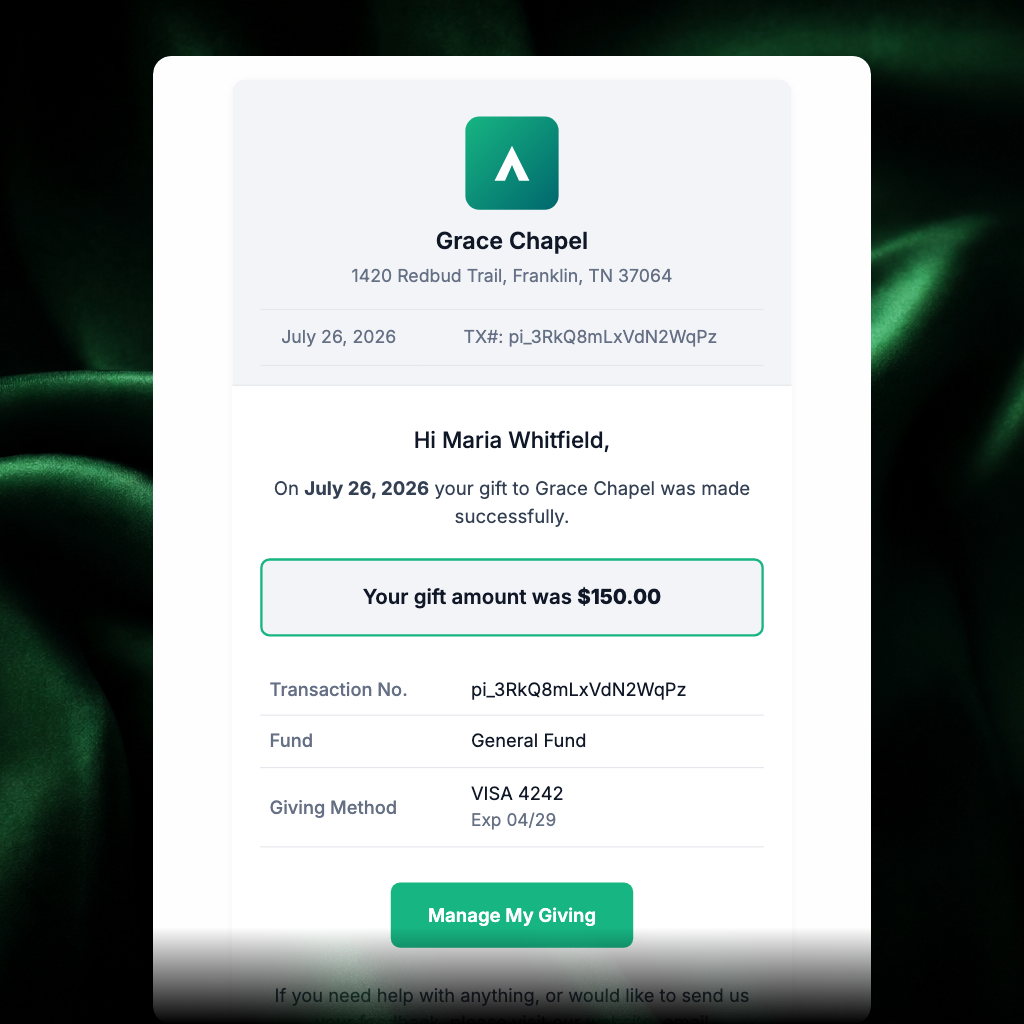
Every time a donor gives — one-time or as part of a recurring schedule — they receive a receipt confirming the gift. It serves as the donor's record of the donation: what they gave, where it went, how they paid, and the legal name your church uses for giving receipts when one is configured.
Bank-account (ACH) gifts work in two stages. Donors receive a processing email when the gift is submitted, then a final gift receipt after the gift clears.
Recurring gift notice
When a donor's scheduled recurring gift processes, they receive a notice letting them know the gift went through — including when their next gift is scheduled, so the schedule is never a surprise. This is the email donors most often ask about ("why did I get this?"): it simply means their recurring gift ran as planned.
Recurring gift updated
When a donor edits a recurring gift, they receive a confirmation showing the updated gift details and the next scheduled gift date. This email is sent only for actual changes, such as amount, fund, frequency, payment method, or next gift date. It is not sent for every normal recurring charge.
For 1st-and-15th gifts, the next gift date reflects the soonest upcoming charge across the linked schedules.
Cancellation confirmation
When a recurring gift is canceled, the donor receives a confirmation that the schedule has ended and no further charges will occur. This gives donors peace of mind that the cancellation actually took effect.
Saved payment method emails
When a donor saves a new payment method or removes one, they may receive a confirmation email. If the saved method is a duplicate of a method already on file, Apollos keeps the existing method and does not send added or removed emails for that duplicate cleanup.
Donor migration emails
When staff send the migration invitation, donors receive instructions to set up their payment method in Apollos and confirm their recurring gifts. Migration emails can include your church's support email and FAQ link, so donors know where to get help before they contact your team. Apollos sends one automatic reminder about 3 days after the initial email if the donor still needs to act.
Set the migration email sender
For donor migration emails, your church can use a verified sender domain so reminders come from an address your donors recognize. You can also set the support email and FAQ URL shown in migration emails.
- In Admin, go to Giving → Settings.
- Open the migration email sender settings.
- Enter the sender domain and register it.
- Add the DNS records shown in Admin with your domain provider.
- Return to Admin and verify DNS.
- Enter the support email and FAQ URL donors should use during migration.
- Save the migration sender email after the domain shows as verified.
If the domain is not registered or verified, Admin blocks saving the sender email so donors do not receive migration messages from an address that cannot be used.
Troubleshooting
Why did a bank-account donor get two emails?
Bank-account (ACH) gifts send two messages on purpose. When the donor submits the gift they get a "gift is processing" email, and when the money clears a few business days later they get the receipt. They no longer get a receipt the moment they submit, because the gift isn't final yet — the second email is the one they keep for their records.
A donor says they got a giving email they don't recognize. What should I tell them?
First, check Giving → Transactions in Admin for a matching gift. A recurring gift notice usually means a recurring schedule the donor set up earlier (sometimes long ago) processed as planned. A recurring gift updated email means the saved schedule changed; it should not be sent for a normal renewal. If there's a matching gift the donor genuinely didn't authorize, treat it like any disputed charge and contact your Apollos representative.
A donor didn't receive a receipt. What should I check?
Ask the donor to check their spam folder and confirm the email address on their profile is current — receipts go to the email associated with their giving profile. If the address is right and emails still aren't arriving, contact your Apollos representative.
Can we customize the content of these emails?
The emails automatically carry your church's branding. For questions about further customization, talk to your Apollos contact.
Why can't I save the migration sender email?
The sender email's domain must be registered and verified first. If the domain status check fails, Admin shows the real error instead of treating the domain as not registered.
Related pages
- How giving works
- Recurring giving
- How to give (for your congregation)
- Giving troubleshooting Giving emails use your church's contact details so donors know how to reach your team with questions, rather than showing Apollos contact information.