


Livestreams
Livestreams bring your services and events into the app as live video. When a service is live, members see a LIVE badge on the card, tap to watch in real time, and — if you save your recordings — can replay the service afterward. It keeps your congregation connected even when they can't attend in person.
How it works
Apollos connects to Church Online Platform (often called "Chop") to power livestreams:
- Your team starts the service broadcast in Church Online Platform, just like you do today.
- Apollos checks Church Online periodically to see whether a service is currently live.
- When a service is live, the app shows a LIVE badge on the stream's card and gives it priority placement.
- When no service is live, the app shows scheduled times or recent recordings instead.
- When a member taps the livestream, the app plays the video directly.
Setting up the Church Online Platform connection is covered in Church Online Platform — this page assumes that connection is already in place.
Note: linking to your livestream provider works on every plan. Automatic schedule sync and the LIVE badge require the Max plan.
Where livestreams appear
- Content feed: livestreams show up in the main feed alongside your other content.
- Live indicator: a live service gets a LIVE badge in the corner of its card, with a red broadcast icon, plus priority placement.
- Direct browsing: members can also navigate to a livestream like any other content item.
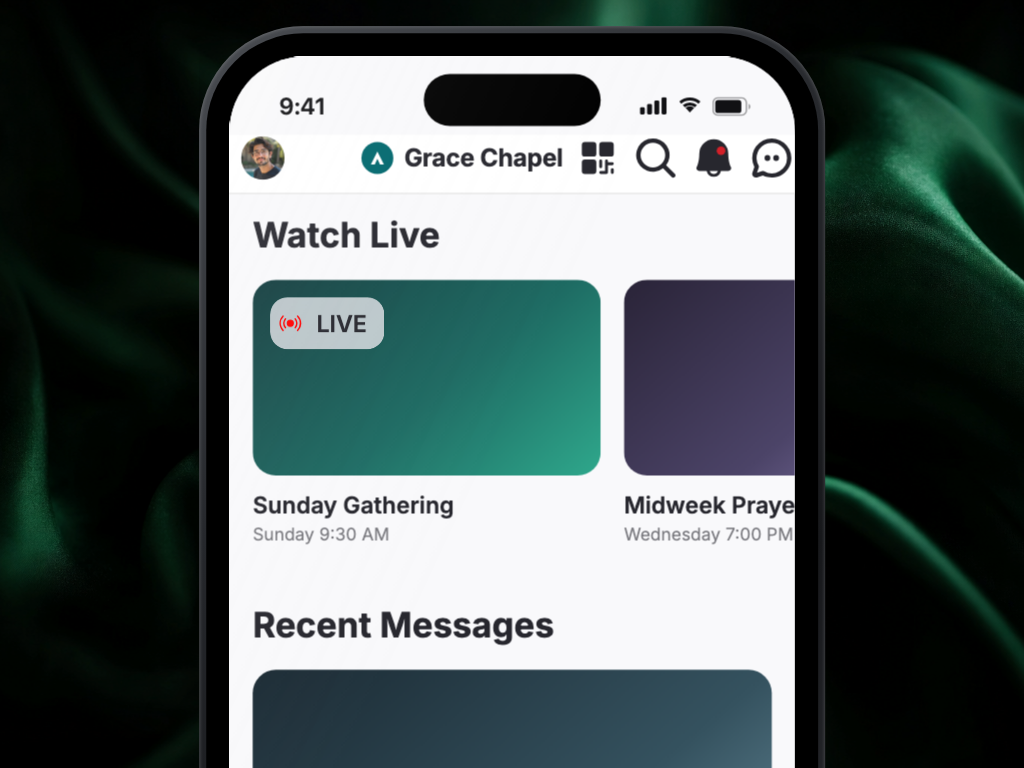
Livestream details
Each livestream includes a title, a short description, start and end times, a cover image, the video stream itself, and optionally a campus association (so multi-campus churches can show each location its own stream).
Cover images
You can upload a custom cover image for each livestream. If you don't, Apollos automatically generates a placeholder using your church's primary brand color — so every livestream has a consistent, polished look even when nobody uploads an image.
Make a past service available for replay
Not every livestream is automatically saved. To offer replays:
- Enable recording/archiving in your streaming platform (YouTube, Vimeo, etc.) so the broadcast is saved.
- The recording can then appear as on-demand content in the app, following the same visibility rules as your other content — it must be active, published, and not expired. See Content overview.
Troubleshooting
Where can I see the livestreams Apollos has synced?
Admin has a Livestreams page listing the services Apollos received from Church Online Platform, so you can confirm what's there before a service starts. It's view-only — create and edit services in Church Online Platform.
We're live — why doesn't the app show it?
This is the most common livestream question. Check in order:
- Is the service actually started in Church Online Platform? Log in to the Church Online dashboard and verify the service is broadcasting. The most common cause is that the service wasn't started in Chop, or was started late.
- Give it a minute or two. Apollos refreshes its connection to Church Online periodically; a brief delay after going live is normal.
- Check the Church Online connection. Wrong or expired credentials prevent Apollos from seeing your live status — see Church Online Platform.
- Still not showing? Contact Apollos support.
The app shows we're live — why won't the video play?
- Is the video feed actually broadcasting? A service can be "started" in Church Online while the encoder or video source (YouTube Live, Vimeo, etc.) isn't streaming yet. Check the source. Services without a playable video link are skipped so members do not see a play button that cannot start.
- Check the stream in the Church Online dashboard. If the stream doesn't play there either, the problem is upstream of the app.
- Test on more than one device. If it plays on iOS but not Android (or vice versa), note the device details and contact Apollos support.
Why is the livestream's cover image missing or wrong?
- Was a custom image uploaded? If not, the auto-generated placeholder (in your brand color) should appear.
- Does the placeholder color look wrong? Check your church's primary theme color in your app configuration — the placeholder uses it.
- If no image appears at all, contact Apollos support.
Why is the livestream under the wrong campus?
Check the campus assigned to that livestream occurrence and correct it. If your livestreams use campus tags, verify the tags too — the fix is the same as for events.
Why are the livestream times wrong?
- Verify the scheduled start and end times on the livestream — the displayed duration is calculated from them, so if either is wrong, both the time and the duration will be off.
- Off by a consistent number of hours? That's a timezone conversion issue — contact Apollos support with the expected and displayed times.
Why can't members replay a past service?
- Was the broadcast saved? Recording/archiving must be enabled in your streaming platform — not all streams are kept automatically.
- Is the replay content visible? Like all content, it must be active, published, and not expired — see Content overview.