


Manage notification preferences
Your church's app sends notifications about the things that matter — prayer requests, community messages, follow requests, and daily habit reminders — and you control exactly what you receive.
How it works
There are two layers to notifications: push notifications that pop up on your phone, and the Activity Center inside the app (the bell icon), which keeps a list of everything regardless of your push settings. You can turn all push notifications on or off, fine-tune them per community, and manage prayer-related updates.
Turn notifications on or off
- Open the app and tap your profile picture (the circle in the upper-left corner).
- Find the Notifications setting.
- Toggle push notifications On or Off.
When push is off, you won't get pop-up notifications — but you can always check the Activity Center for updates.
Set notification levels for each community
If you're in several communities, you can pick a different notification level for each one:
Open the community you want to adjust.
Tap the community name at the top of the chat to open its profile.
Scroll to the Notifications card — it's the fourth card down.
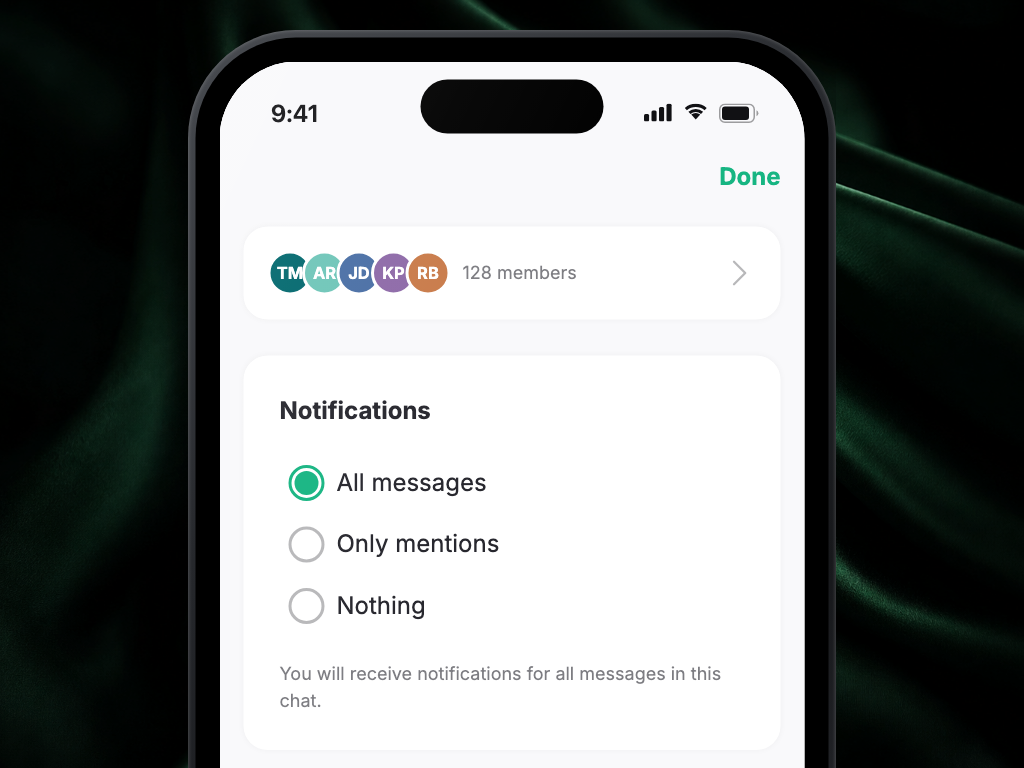
Choose one:
- All messages — a notification for every new message
- Only mentions — only when someone mentions you by name
- Nothing — mute this community (you can still read messages anytime)
Your choice saves as soon as you tap it — there's no Save button. The card only appears for communities you've joined and whose chat you're part of.
Tip: for very active communities, Only mentions keeps you informed without the noise.
Turn on daily habit reminders
If you use the Daily tab for Gratitude, Prayer, and Scripture, you can get a gentle reminder when the day is winding down and you haven't completed your habits yet. From the Daily tab, tap View History on your streak, then turn on Daily habit streak reminder at the bottom of the page — it helps keep your streak going.
Check the Activity Center
Tap the bell icon at the top of the screen to open the Activity Center.
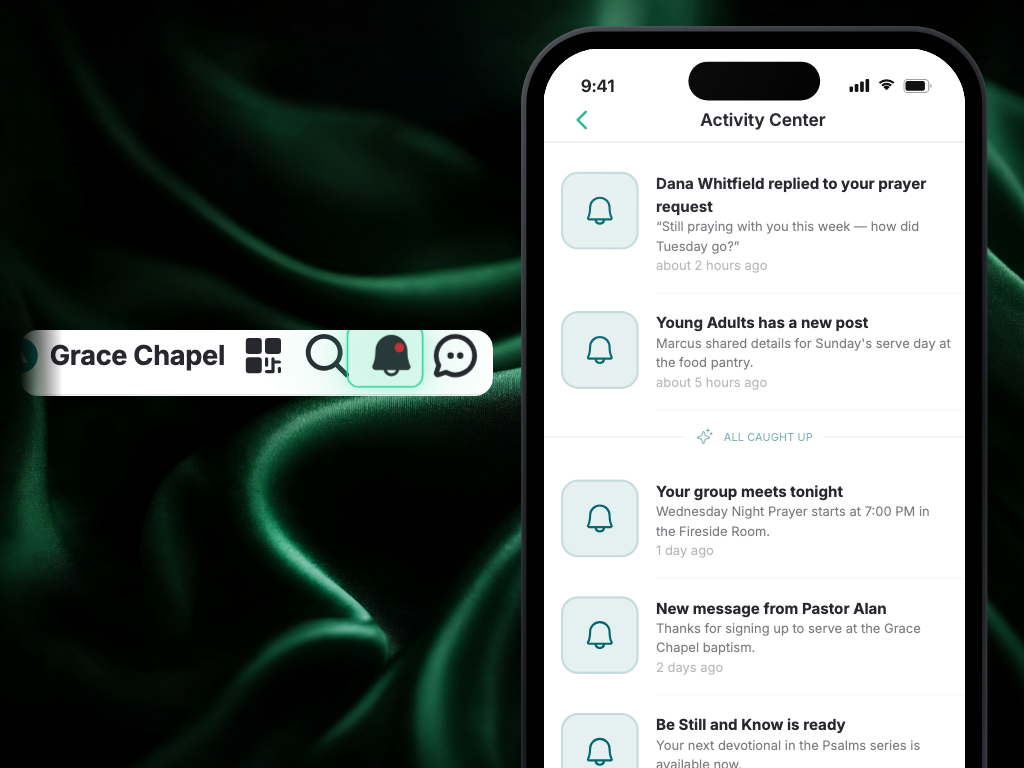 Here you'll find:
- Follow requests — accept or hide requests from other members
- Prayer updates — see when someone prayed for your request, shared an update, or when a prayer needs follow-up
- Community invites — accept invitations to join new communities
- Discussion replies — responses to your comments and posts
Prayer follow-up and update items include prayer artwork and open the prayer detail view, so you can respond in context. The Activity Center shows everything even if push notifications are turned off.
FAQ
Why am I not receiving notifications?
Work through these in order:
- Make sure notifications are turned on in the app (profile → Notifications).
- Check your phone's settings — go to Settings → Notifications and make sure your church's app is allowed to send them.
- On Android, check that battery optimization isn't restricting the app.
- Close the app completely and reopen it.
If none of that works, reach out to your church office for help.
Can I mute one community without muting everything?
Yes. Open that community, tap its name at the top, scroll to the Notifications card, and set it to Nothing. You'll still see all the messages whenever you open it.
I turned off push notifications — will I miss things?
No. Everything still lands in the Activity Center (the bell icon), so you can catch up whenever you open the app.
Can I choose which prayer notifications I get?
Yes. Your notification settings include prayer, so you decide whether to hear when someone prays for your request, when someone shares an update, or when one of your prayers is ready for a follow-up. Everything still appears in the Activity Center even if you turn those push notifications off.